Objetivo
O objetivo deste artigo é realizar uma comunicação wireless entre um setup controlado por uma STM32F0Discovery e um PC, o primeiro composto por um módulo Bluetooth HC-05 e o último por um HC-06.
Pré-requisitos
Para acompanhar este projeto, serão necessários:
- Conhecer o STM32CubeMX e o uVision 5;
- Entendimento de estrutura de dados e ponteiro de função em linguagem C.
Materiais
Materiais necessários:
- Um módulo Bluetooth HC-05 e um HC-06;
- O setup realizado no artigo anterior: STM32F0Discovery + LCD;
- Um conversor UART/USB;
- Cabos com conectores tipo fêmea.
Configurações de hardware
Como premissa, aproveitaremos o projeto do STM32CubeMX do artigo anterior para esta aplicação, assim abra o projeto citado e realize as seguintes configurações:

Os Melhores Treinamentos sobre Sistemas embarcados e IoT
Cursos com professores qualificados para acelerar sua carreira e projetos
- No periférico USART2, modifique o estado de Mode para Asynchronous. Feito isto, verá que os pinos PA2 (USART2_TX) e PA3 (USAT2_RX) ficarão em “verde escuro” (visualizando a figura do microcontrolador);
- Assim, gere os arquivos necessários para o uVision 5.
Conexões dos hardwares
Antes de mais nada, o PC nesta aplicação funcionará como um slave device, ou seja, receberá mensagens (strings) da Discovery, assim o hardware para o device será:
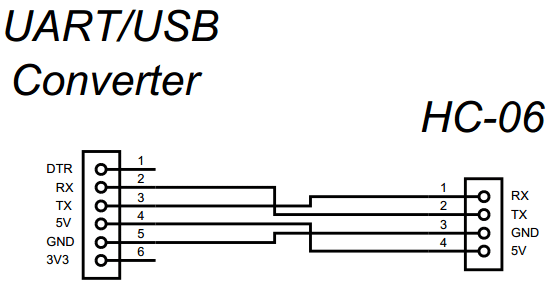
O esquema de conexão da Discovery é visto a seguir:

Código
Com o mesmo projeto (.uvprojx) do uVision 5 do artigo anterior, abra e realize a escrita do código a seguir:
/* Includes ------------------------------------------------------------------*/
#include "stm32f0xx_hal.h"

/* USER CODE BEGIN Includes */
#include "LCD.h"
#include "string.h"
#include "stdio.h"
/* USER CODE END Includes */

/* Private variables ---------------------------------------------------------*/
UART_HandleTypeDef huart2;

/* USER CODE BEGIN PV */
/* Private variables ---------------------------------------------------------*/

#define NUM_FUNC_BT			(unsigned char)4
#define INIT_CPLT_BT		(unsigned char)7
#define RX_BUFFER_SIZE 		(unsigned char)10

#define _2s	(unsigned int)2000
#define _4s	(unsigned int)4000

enum
{
	SendAt		= 0,
	SetConfOrgl	,
	SetUART		,
	SetName		,
	SetPswd		,
	SetRole		,
	SetCmode		,
	InitBluetooth
};

enum
{
	SendCmdBt = 0,
	WaitCpltBt,
	NextBt	,
	FinishBt
};

uint8_t CmdAt1[] = {"AT\r\n"};
uint8_t CmdAt2[] = {"AT+ORGL\r\n"};
uint8_t CmdAt3[] = {"AT+UART=38400,0,0\r\n"};
uint8_t CmdAt4[] = {"AT+NAME=BTMASTER\r\n"};
uint8_t CmdAt5[] = {"AT+PSWD=1234\r\n"};
uint8_t CmdAt6[] = {"AT+ROLE=1\r\n"};
uint8_t CmdAt7[] = {"AT+CMODE=1\r\n"};
uint8_t CmdAt8[] = {"AT+INIT\r\n"};

typedef void(*pFunc)(void);
pFunc pInitBt;

typedef struct
{
	uint8_t 	*pData[8];
	uint8_t 	LengData[8];
	uint8_t	State;
	uint8_t 	Index;
	uint32_t 	TimeOut;
	pFunc	pFuncBt[NUM_FUNC_BT];
}BT_TypeDef;

BT_TypeDef BtData;
uint8_t RxBuffer[RX_BUFFER_SIZE] = {0};

/* USER CODE END PV */

/* Private function prototypes -----------------------------------------------*/
void SystemClock_Config(void);
static void MX_GPIO_Init(void);
static void MX_USART2_UART_Init(void);

/* USER CODE BEGIN PFP */
/* Private function prototypes -----------------------------------------------*/
void vSendCmdBt	(void);
void vWaitCpltBt	(void);
void vFinishBt		(void);
void vNextCommandBt	(void);
void vInitBlueTooth	(BT_TypeDef* Bt);

/* USER CODE END PFP */

/* USER CODE BEGIN 0 */

void vSendCmdBt(void)
{
	HAL_UART_Transmit(&huart2, BtData.pData[BtData.Index], BtData.LengData[BtData.Index], 10);

	/* If the all command were sent and returning "OK", then FINISH the Bluetooth init.. */
	if(BtData.Index >= INIT_CPLT_BT)
	{
		BtData.State = FinishBt;
		pInitBt 	   = BtData.pFuncBt[BtData.State];
	}
	else
	{
		/* Keep sendig AT commands */
		BtData.State 	= WaitCpltBt;
		pInitBt 		= BtData.pFuncBt[BtData.State];
	}
}

void vWaitCpltBt(void)
{
	BtData.TimeOut = HAL_GetTick();

	HAL_UART_Receive(&huart2, RxBuffer, RX_BUFFER_SIZE, 10);

	/* The return command is "OK", indicating that sent command was right */
	if(RxBuffer[0] == 'O' && RxBuffer[1] == 'K')
	{
		BtData.TimeOut = 0;
		BtData.State 	= NextBt;
		pInitBt 		= BtData.pFuncBt[BtData.State];
	}
	else
	{
		/* Timeout procedure */
		if(BtData.TimeOut >= _4s)
		{
			LCD_Clear();
			LCD_GoTo(0,1);
			LCD_SendText("BlueTooth Fail!");
			LCD_GoTo(0,2);
			LCD_SendText("Reset the board!");
			for(;;){}
		} /* Send another command to try stablish the comunication */
		else if(BtData.TimeOut >= _2s)
		{
			BtData.State = SendCmdBt;
			pInitBt 	   = BtData.pFuncBt[BtData.State];
		}
	}
}

void vFinishBt(void)
{
	return; /* Back to main */
}

void vNextCommandBt(void)
{
	uint8_t i;
	BtData.Index++;

	/* Clean the Buffer */
	for(i = 0; i < sizeof(RxBuffer) / sizeof(uint8_t); i++)
	{
		RxBuffer[i] = 0;
	}
	BtData.State 	= SendCmdBt;
	pInitBt 	   	= BtData.pFuncBt[BtData.State];
}


void vInitBlueTooth(BT_TypeDef* Bt)
{
	if(Bt != NULL)
	{
		/* Load the pointer vector with the AT comand adresses */
		Bt->pData[SendAt] 		= CmdAt1;
		Bt->pData[SetConfOrgl] 	= CmdAt2;
		Bt->pData[SetUART] 		= CmdAt3;
		Bt->pData[SetName] 		= CmdAt4;
		Bt->pData[SetPswd] 		= CmdAt5;
		Bt->pData[SetRole] 		= CmdAt6;
		Bt->pData[SetCmode] 	= CmdAt7;
		Bt->pData[InitBluetooth] = CmdAt8;

		/* inform the size of the contents pointed */
		Bt->LengData[SendAt] 	 	= (sizeof(CmdAt1)/sizeof(uint8_t)) - 1;
		Bt->LengData[SetConfOrgl] 	= (sizeof(CmdAt2)/sizeof(uint8_t)) - 1;
		Bt->LengData[SetUART] 		= (sizeof(CmdAt3)/sizeof(uint8_t)) - 1;
		Bt->LengData[SetName] 		= (sizeof(CmdAt4)/sizeof(uint8_t)) - 1;
		Bt->LengData[SetPswd] 		= (sizeof(CmdAt5)/sizeof(uint8_t)) - 1;
		Bt->LengData[SetRole] 		= (sizeof(CmdAt6)/sizeof(uint8_t)) - 1;
		Bt->LengData[SetCmode] 		= (sizeof(CmdAt7)/sizeof(uint8_t)) - 1;
		Bt->LengData[InitBluetooth] 	= (sizeof(CmdAt8)/sizeof(uint8_t)) - 1;

		/* Load the function pointer vector */
		Bt->pFuncBt[SendCmdBt] 	= vSendCmdBt;
		Bt->pFuncBt[WaitCpltBt] 	= vWaitCpltBt;
		Bt->pFuncBt[NextBt	]	= vNextCommandBt;
		Bt->pFuncBt[FinishBt]	= vFinishBt;

		/* Load the first routine to run and set the state */
		Bt->Index 	 = 0;
		Bt->TimeOut	 = 0;
		Bt->State = SendCmdBt;
		pInitBt 	= Bt->pFuncBt[Bt->State];

		for(;;)
		{
			/* Function pointer of application */
			(*pInitBt)();

			if(pInitBt == vFinishBt)
			{
				break;
			}
		}
	}
	else
	{
		return;
	}
}

/* USER CODE END 0 */

int main(void)
{

  /* USER CODE BEGIN 1 */
  uint8_t msg[] = {"EMBARCADOS!\r\n"};
  /* USER CODE END 1 */

  /* MCU Configuration----------------------------------------------------------*/

  /* Reset of all peripherals, Initializes the Flash interface and the Systick. */
  HAL_Init();

  /* Configure the system clock */
  SystemClock_Config();

  /* Initialize all configured peripherals */
  MX_GPIO_Init();
  MX_USART2_UART_Init();

  /* USER CODE BEGIN 2 */
  LCD_Init();

  LCD_Clear();
  LCD_GoTo(2,0);
  LCD_SendText("STM32f0DISCO");
  LCD_GoTo(8,1);
  LCD_SendText("+");
  LCD_GoTo(3,2);
  LCD_SendText("Bluetooth");

  LCD_GoTo(0,3);
  LCD_SendText("Msg: EMBARCADOS!");


  vInitBlueTooth(&BtData);

  /* USER CODE END 2 */

  /* Infinite loop */
  /* USER CODE BEGIN WHILE */

	while(1)
	{
	/* USER CODE END WHILE */

		/* USER CODE BEGIN 3 */
		HAL_GPIO_TogglePin(LD3_GPIO_Port, LD3_Pin);
		HAL_GPIO_TogglePin(LD4_GPIO_Port, LD4_Pin);

		HAL_UART_Transmit(&huart2, msg, (sizeof(msg) / sizeof(uint8_t) - 1), 10);
		HAL_Delay(500);

	}
	/* USER CODE END 3 */
}
Como podemos ver, foi criada uma estrutura de dados com as variáveis relacionadas ao módulo Bluetooth, bem como um vetor de ponteiro que conterá os endereços dos comandos AT a serem enviados e também um vetor de ponteiro de função, o qual conterá os endereços das funções que farão a inicialização do dito hardware. Além disso, esta estrutura foi instanciada com BtData.
Na função vInitBlueTooth(BT_TypeDef* Bt) é feita a inicialização da estrutra (carrega as variáveis, vetores de ponteiro e função com os respectivos endereços) e também do módulo por meio de uma máquina de estados finitos (FSM). Dentro desta máquina, é enviado cada comando AT (vide os vetores CmdAt1 até CmdAt8), levando em consideração que para cada comando enviado deve-se receber um OK, confirmado que a configuração foi realizada com sucesso. Além disso, foi implementado um Timeout em que: se houver algum erro no envio de algum comando, o algoritmo envia novamente o comando em questão, porém se houver um segundo erro, haverá o timeout (indicando no display a falha).
A variável BtData.State funcionará como indexador do vetor de ponteiro de função, como também o indicador do estado da máquina para ajudar no processo de depuração.
A interação do módulo com a Discovery é feita serialmente utilizando as funções: HAL_UART_Receive() e HAL_UART_Transmit(), ambas possuem timeout de 10ms.
Finalizando todo o setup com a Discovery, escrita do código, compilada a aplicação sem erros e gravado o microcontrolador do kit, falta agora realizar a configuração do device (conexão realizada conforme esquema e conversor UART/USB conectado ao PC). A configuração deste pode ser realizada conforme o artigo do Wenderson Oliveira: Comunicação entre módulos Bluetooth HC-05 e HC-06, claro, considerando o HC-06, os mesmos parâmetros e, se preferir, o mesmo terminal que ele utilizou, ou seja, o RealTerm.
Realizada a configuração do device, o LED deste ficará piscando, indicando falta emparelhamento com outro dispositivo ou o mestre, assim como o LED do HC-05. Além disso, no display será vista a mensagem: “Bluetooh Fail! Reset the board!”. Não se preocupe, pois para iniciar corretamente e realizar o emparelhamento correto, deve-se segurar a tact switch deste módulo e pressionar o Reset da Discovery e depois soltando a tact switch. Logo, o emparelhamento será indicado pelo piscar dos dois LEDs (1Hz) do kit (vide main), a mensagem: “STM32F0DISCO + Bluetooth – Msg: EMBARCADOS!”, o LED do device aceso e o do HC-05 piscando a 2Hz com intervalos longos.
No terminal do PC, pode ser vista a seguinte imagem:

Funcionamento
O funcionamento da aplicação pode ser visto no vídeo a seguir: