

O protocolo SPI
Dando continuidade aos artigos sobre acesso a dispositivos típicos de sistemas embarcados no Linux, vamos abordar neste artigo Comunicação SPI em Linux. Por enquanto apenas visando softwares em espaço de usuário.
O protocolo SPI (Serial Peripheral Interface) foi definido pela Motorola. É um protocolo serial síncrono semelhante ao protocolo I2C, mas que utiliza três fios para comunicação e pode alcançar velocidades superiores ao I2C. A interface física é composta pelos sinais MOSI, MISO e SCLK que ligam a todos os dispositivos na forma de barramento. Pode existir também um quarto fio para seleção do dispositivo com o qual a comunicação será feita.
Assim como o I2C, o SPI apresenta o conceito de mestre e escravo da comunicação. O mestre inicia a transferência de dados e controla o sinal de clock para estabelecer o sincronismo. A transferência de dados processa-se em full-duplex sobre os sinais MOSI (Master Output Slave Input) e MISO (Master Input Slave Output). A taxa de transferência é definida pelo processador, no papel de mestre, através do sinal SCLK. A seleção do periférico é feita através do sinal SSn. Nessa configuração, pode haver um mestre e vários escravos no barramento SPI, como mostrado na Figura 1.
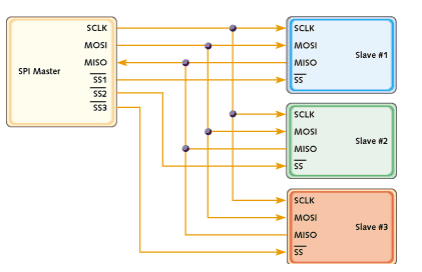
O fluxo de dados é controlado pelo mestre através do sinal de clock SCLK. Só há transferência enquanto o mestre pulsar o sinal SCLK. Em repouso o sinal SCLK encontra-se estável com o valor lógico definido por CPOL.

Os Melhores Treinamentos sobre Sistemas embarcados e IoT
Cursos com professores qualificados para acelerar sua carreira e projetos
Habilitando o driver SPI em Linux
Assim como para o I2C, o Linux disponibiliza um driver genérico para SPI. Ele cria entradas no diretório /dev para que o usuário possa acessar o dispositivo SPI como um arquivo através da funções open(), close(), read() e write(). Por ser um driver genérico, ele pode não atender a todos os requisitos do seu projeto. Se você pretende usar o chipset ENC28J60 para construir uma interface ethernet, por exemplo, você precisará de um driver específico. Para esse chipset já existe um driver no Linux. Mas, para um outro chipset que não tenha suporte no Linux, você deverá desenvolvê-lo.
Saiba que, para se comunicar com um dispositivo SPI em Linux, por meio da sua infraestrutura, o processador da placa que você está usando precisa ter o driver do controlador SPI presente no kernel. No artigo Linux Device Drivers – Diferenças entre Drivers de Plataforma e de Dispositivo explico em detalhes o funcionamento geral dos drivers. Consulte essa referência!
Agora vamos habilitar o driver SPI no kernel. Selecione Device Driver:

Habilite o suporte a SPI apertando ‘y’, depois aperte ENTER:

Habilite o suporte ao driver SPI em Linux como módulo apertando ‘m’ ou ‘y’ para deixar o driver embutido no kernel:
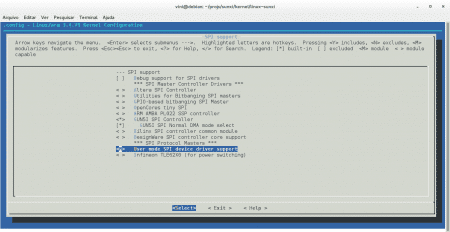
Agora basta compilar o kernel!
Comunicação SPI em Linux
Agora veremos um exemplo de software para escrever e ler um dispositivo qualquer que utiliza o protocolo SPI. O dispositivo mais simples para fazer um teste é uma memória Flash. Mas pode ser usado qualquer outro dispositivo, como um módulo RFID.
Exemplo de software para SPI:
/*
 * Exemplo de software para comunicacao SPI
 *
 * Autor: Vinicius Maciel
 *
 * comando para compilacao: gcc spi_teste.c -o spi_teste
 *
 * comando para cross compilacao: arm-linux-gnueabihf-gcc spi_teste.c -o spi_teste
 */

#include <stdint.h>
#include <unistd.h>
#include <stdio.h>
#include <stdlib.h>
#include <getopt.h>
#include <fcntl.h>
#include <sys/ioctl.h>
#include <linux/types.h>

#include "spidev.h"

#define ARRAY_SIZE(a) (sizeof(a) / sizeof((a)[0]))

/* Funcao que imprime mensagem de erro e aborta o programa
 *
 */
static void pabort(const char *s)
{
    perror(s);
    abort();
}

// Nome do dispositivo de driver SPI no diretorio /dev
static const char *device = "/dev/spidev0.0"; // (Mude de acordo com sua placa)
// Modo de operacao do controlador SPI do SoC
static uint32_t mode;
// Quantidade de bits da palavra de transferencia SPI
static uint8_t bits = 8;
// Velocidade de comunicao
static uint32_t speed = 1000000;
// Delay entre bytes transferidos, caso necessario
static uint16_t delay;

/*
 * Funcao que realiza uma transferencia full duplex,
 * ou seja, que escreve e ler ao mesmo tempo
 *
 * Parametros ----
 * fd: inteiro retornado pela funcao open()
 * tx: para de escrita para mensagem SPI
 * rx: buffer de leitura de mensagem SPI
 */
static void transfer(int fd, uint8_t *tx, uint8_t *rx)
{
    int ret;

    // Estrutura que contem as informacoes para a transmissao da mensagem
    struct spi_ioc_transfer tr = {
	    .tx_buf = (unsigned long)tx,
	    .rx_buf = (unsigned long)rx,
	    .len = ARRAY_SIZE(tx),
	    .delay_usecs = delay,
	    .speed_hz = speed,
	    .bits_per_word = bits,
    };

    // Funcao que faz a transferencia full duplex
    ret = ioctl(fd, SPI_IOC_MESSAGE(1), &tr);
    if (ret < 1)
	    pabort("Nao foi possivel enviar mensagem SPI");

    // Imprimi a mensagem recebida, caso haja alguma
    for (ret = 0; ret < ARRAY_SIZE(rx); ret++) {
	    printf("%x ", rx[ret]);
    }
    puts("");
}


int main(int argc, char *argv[])
{
    int ret = 0, i;
    int fd;
    // Buffers para leitura e escrita da mensagem SPI
    uint8_t tx_buffer[32], rx_buffer[32];


    // Abri o dispositivo de driver SPI e retorna um inteiro
    fd = open(device, O_RDWR);
    if (fd < 0)
	pabort("Erro ao abrir o dispositivo");

    // Escolha outros modos de operacao que o SPI da sua placa suporta
    mode = SPI_CPHA | SPI_CPOL | SPI_MODE_0;

    // Configura o modo de operacao
    ret = ioctl(fd, SPI_IOC_WR_MODE32, &mode);
    if (ret == -1)
	    pabort("Erro ao setar o modo do SPI");

    ret = ioctl(fd, SPI_IOC_RD_MODE32, &mode);
    if (ret == -1)
	    pabort("Erro ao setar o modo do SPI");

    // Configura o tamanho da palavra de transferencia SPI para escrita
    ret = ioctl(fd, SPI_IOC_WR_BITS_PER_WORD, &bits);
    if (ret == -1)
	    pabort("Erro ao setar os bits por palavra");

    // Configura o tamanho da palavra de transferencia SPI para leitura
    ret = ioctl(fd, SPI_IOC_RD_BITS_PER_WORD, &bits);
    if (ret == -1)
	    pabort("Erro ao ler os bits por palavra");

    // Configura a maxima velocidade de transferencia para escrita
    ret = ioctl(fd, SPI_IOC_WR_MAX_SPEED_HZ, &speed);
    if (ret == -1)
	    pabort("Erro ao setar a velocidade maxima em HZ");

    // Configura a maxima velocidade de transferencia para leitura
    ret = ioctl(fd, SPI_IOC_RD_MAX_SPEED_HZ, &speed);
    if (ret == -1)
	    pabort("Erro ao ler a velocidade maxima em HZ");

    // Imprimi informacoes de configuracao do SPI
    printf("Modo SPI: 0x%x\n", mode);
    printf("bits por palavra: %d\n", bits);
    printf("Maxima velocidade: %d Hz (%d KHz)\n", speed, speed/1000);

    // Preenche o buffer de transferencia com numeros de 0 a 9
    for (i = 0; i < 9; i++)
	tx_buffer[i] = i;

    // Faz a transferencia full duplex
    transfer(fd, tx_buffer, rx_buffer);

    // Fecha o dispositivo de driver SPI
    close(fd);

    return ret;
}
Para que o código seja compilado, é necessário incluir o seguinte código de cabeçalho:
/*
 * include/linux/spi/spidev.h
 *
 * Copyright (C) 2006 SWAPP
 *	Andrea Paterniani <a.paterniani@swapp-eng.it>
 *
 * This program is free software; you can redistribute it and/or modify
 * it under the terms of the GNU General Public License as published by
 * the Free Software Foundation; either version 2 of the License, or
 * (at your option) any later version.
 *
 * This program is distributed in the hope that it will be useful,
 * but WITHOUT ANY WARRANTY; without even the implied warranty of
 * MERCHANTABILITY or FITNESS FOR A PARTICULAR PURPOSE.  See the
 * GNU General Public License for more details.
 *
 * You should have received a copy of the GNU General Public License
 * along with this program; if not, write to the Free Software
 * Foundation, Inc., 675 Mass Ave, Cambridge, MA 02139, USA.
  */

#ifndef SPIDEV_H
#define SPIDEV_H

#include <linux/types.h>

/* User space versions of kernel symbols for SPI clocking modes,
 * matching <linux/spi/spi.h>
 */

#define SPI_CPHA		0x01
#define SPI_CPOL		0x02

#define SPI_MODE_0		(0|0)
#define SPI_MODE_1		(0|SPI_CPHA)
#define SPI_MODE_2		(SPI_CPOL|0)
#define SPI_MODE_3		(SPI_CPOL|SPI_CPHA)

#define SPI_CS_HIGH		0x04
#define SPI_LSB_FIRST		0x08
#define SPI_3WIRE		0x10
#define SPI_LOOP		0x20
#define SPI_NO_CS		0x40
#define SPI_READY		0x80
#define SPI_TX_DUAL		0x100
#define SPI_TX_QUAD		0x200
#define SPI_RX_DUAL		0x400
#define SPI_RX_QUAD		0x800

/*---------------------------------------------------------------------------*/

/* IOCTL commands */

#define SPI_IOC_MAGIC			'k'

/**
 * struct spi_ioc_transfer - describes a single SPI transfer
 * @tx_buf: Holds pointer to userspace buffer with transmit data, or null.
 *	If no data is provided, zeroes are shifted out.
 * @rx_buf: Holds pointer to userspace buffer for receive data, or null.
 * @len: Length of tx and rx buffers, in bytes.
 * @speed_hz: Temporary override of the device's bitrate.
 * @bits_per_word: Temporary override of the device's wordsize.
 * @delay_usecs: If nonzero, how long to delay after the last bit transfer
 *	before optionally deselecting the device before the next transfer.
 * @cs_change: True to deselect device before starting the next transfer.
 *
 * This structure is mapped directly to the kernel spi_transfer structure;
 * the fields have the same meanings, except of course that the pointers
 * are in a different address space (and may be of different sizes in some
 * cases, such as 32-bit i386 userspace over a 64-bit x86_64 kernel).
 * Zero-initialize the structure, including currently unused fields, to
 * accommodate potential future updates.
 *
 * SPI_IOC_MESSAGE gives userspace the equivalent of kernel spi_sync().
 * Pass it an array of related transfers, they'll execute together.
 * Each transfer may be half duplex (either direction) or full duplex.
 *
 *	struct spi_ioc_transfer mesg[4];
 *	...
 *	status = ioctl(fd, SPI_IOC_MESSAGE(4), mesg);
 *
 * So for example one transfer might send a nine bit command (right aligned
 * in a 16-bit word), the next could read a block of 8-bit data before
 * terminating that command by temporarily deselecting the chip; the next
 * could send a different nine bit command (re-selecting the chip), and the
 * last transfer might write some register values.
 */
struct spi_ioc_transfer {
	__u64		tx_buf;
	__u64		rx_buf;

	__u32		len;
	__u32		speed_hz;

	__u16		delay_usecs;
	__u8		bits_per_word;
	__u8		cs_change;
	__u8		tx_nbits;
	__u8		rx_nbits;
	__u16		pad;

	/* If the contents of 'struct spi_ioc_transfer' ever change
	 * incompatibly, then the ioctl number (currently 0) must change;
	 * ioctls with constant size fields get a bit more in the way of
	 * error checking than ones (like this) where that field varies.
	 *
	 * NOTE: struct layout is the same in 64bit and 32bit userspace.
	 */
};

/* not all platforms use <asm-generic/ioctl.h> or _IOC_TYPECHECK() ... */
#define SPI_MSGSIZE(N) \
	((((N)*(sizeof (struct spi_ioc_transfer))) < (1 << _IOC_SIZEBITS)) \
		? ((N)*(sizeof (struct spi_ioc_transfer))) : 0)
#define SPI_IOC_MESSAGE(N) _IOW(SPI_IOC_MAGIC, 0, char[SPI_MSGSIZE(N)])


/* Read / Write of SPI mode (SPI_MODE_0..SPI_MODE_3) (limited to 8 bits) */
#define SPI_IOC_RD_MODE			_IOR(SPI_IOC_MAGIC, 1, __u8)
#define SPI_IOC_WR_MODE			_IOW(SPI_IOC_MAGIC, 1, __u8)

/* Read / Write SPI bit justification */
#define SPI_IOC_RD_LSB_FIRST		_IOR(SPI_IOC_MAGIC, 2, __u8)
#define SPI_IOC_WR_LSB_FIRST		_IOW(SPI_IOC_MAGIC, 2, __u8)

/* Read / Write SPI device word length (1..N) */
#define SPI_IOC_RD_BITS_PER_WORD	_IOR(SPI_IOC_MAGIC, 3, __u8)
#define SPI_IOC_WR_BITS_PER_WORD	_IOW(SPI_IOC_MAGIC, 3, __u8)

/* Read / Write SPI device default max speed hz */
#define SPI_IOC_RD_MAX_SPEED_HZ		_IOR(SPI_IOC_MAGIC, 4, __u32)
#define SPI_IOC_WR_MAX_SPEED_HZ		_IOW(SPI_IOC_MAGIC, 4, __u32)

/* Read / Write of the SPI mode field */
#define SPI_IOC_RD_MODE32		_IOR(SPI_IOC_MAGIC, 5, __u32)
#define SPI_IOC_WR_MODE32		_IOW(SPI_IOC_MAGIC, 5, __u32)

#endif /* SPIDEV_H */
Este artigo foi originalmente publicado no site Software Livre.








Parabéns, muito bom seu artigo.
Valeu Mário! Espero escrever outros depois. 😀
Excelente! Parabéns pela iniciativa Vinicius.
Ok, obrigado Ronaldo.
Olá Vinicius, em nossa empresa estamos pensando em usar plataforma de Hardware aberta Linux e talvez precisaremos de contratar freelancer para ajudar nas interfaces com dispositivos externos…passe seu contato para eu te explicar melhor …Abs. Reginaldo ….reginaldo@trielo.com.br
Olá, desculpa, não estou recebendo notificações dos comentários.